

Documentation Index

Fetch the complete documentation index at: https://docs.usechamber.io/llms.txt

Use this file to discover all available pages before exploring further.

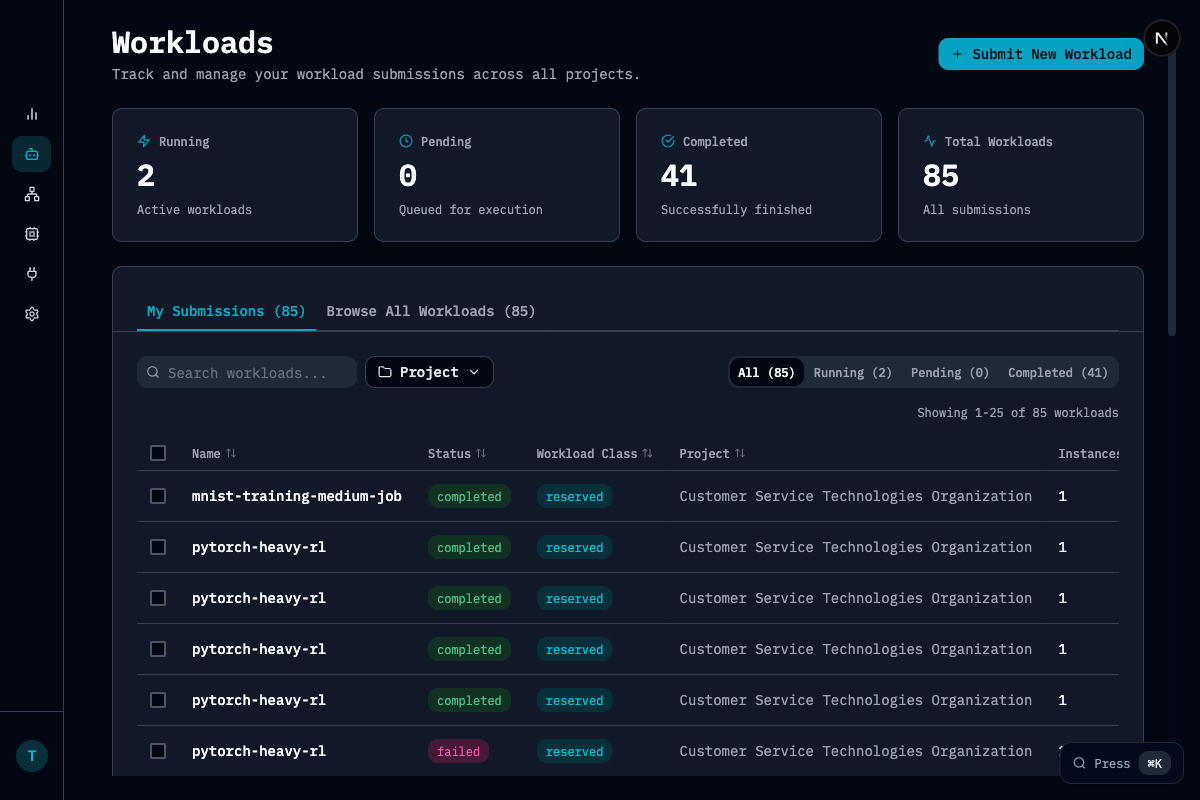
The Workloads page lets you track and manage all GPU workloads across your organization. Workloads

Key Metrics

MetricDescription
RunningActive workloads currently executing
PendingWorkloads queued for execution
CompletedSuccessfully finished workloads
Total WorkloadsAll submissions in the selected time range

Features

  • Search and filter: Find workloads by name, status, project, or workload class
  • My Submissions vs Browse All: Toggle between your workloads and all organization workloads
  • Status tabs: Quick filter by Running, Pending, or Completed
  • Workload details: Click any workload to see detailed information, events, and metrics

Workload States

StateDescription
RunningActively executing on GPU resources
PendingWaiting in queue for available capacity
CompletedFinished successfully
FailedTerminated with error

Workload Classes

Reserved vs elastic workloads

Scheduling

How workloads are scheduled